
Tenders search
All tenders can be found on the search field on the main page of the site.
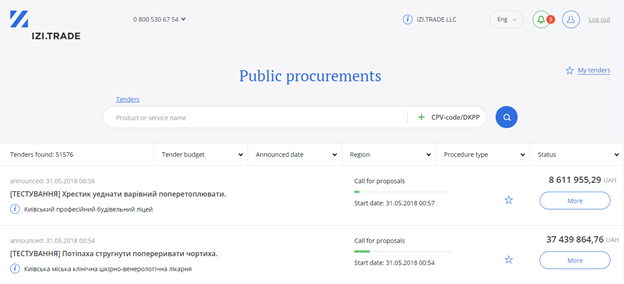
You can easily search for a tender by using Search Line:

Here you can set your criteria for a tender search:
- Key words on the subject of the tender
- Specific tender identifier - CPV
- Name of Customer
Search operators
By default the search returns tenders that contain all of the words you enter. Use separators to change this logic:
| What to type | What it finds |
|---|---|
cartridge | tenders that contain the word "cartridge" (and its forms) |
cartridge, laser | tenders that contain both words — "cartridge" and "laser" |
cartridge laser | the same as with a comma: a space between words means "find all of these words" |
cartridge | toner | tenders that contain at least one of the words — "cartridge" or "toner" |
cartridge laser | toner | "cartridge" and "laser" together, or "toner": a comma and a space join words into a group, while | separates alternative groups |
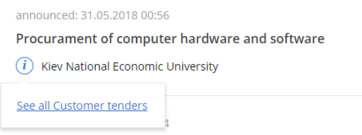
In addition, you have an opportunity to search all tenders of particular Customer. To do this, you need to open an informative window and click the link ‘To review all the tenders of the Customer’:
Use filters for more accurate tenders search.

You can filter your tenders by:
- Tender budget
- Date of tender announcement
- Region of announced tender
- Type of tender
- Tender status